Friday, July 30, 2010

Disabling an ASP.NET button when clicked

Hi all,

In one of my projects, I had an requirement where when a user browse a file via "FileUpload" control and hit the "Submit" button then button should be disabled. Moreover, I thought besides disabling the button I could display an image as well so that the user interface is more interactive. I have developed a custom user control that is hosted in an application page.

After "Googling" for this requirement, I found a couple sample but most of them used "HTML" input controls. But, I wanted an <asp:Button> control. Finally, I got the trick. When we double click on the "Submit" button, then an event handler has been generated with a "OnClick" server side code. We can leverage on "OnClientClick" property that executes a client side script. Besides this "OnClientClick" property we need to implement our own custom javascript that disables the button. UseSubmitBehavior="false" - Indicates that the button control should use the ASP.NET postback mechanism instead of the client browser's submit mechanism (UseSubmitBehavior property).

 <script type="text/javascript" language="javascript">
        function disableBtn(btnID, newText) {

            var btn = document.getElementById(btnID);
            btn.disabled = true;
            btn.value = newText;

            //Setting Image properties 
            btn.style.backgroundImage = 'url(/_layouts/images/projectName/ajax-loader.gif)';
            btn.style.backgroundRepeat = 'no-repeat';
            btn.style.backgroundPosition = 'center';

        }
    </script>
 
<asp:button id="btnOne" tabIndex="0" 
                    Runat="server" Text="Submit"
                    onclick="btnOne_Click" 
                    OnClientClick="disableBtn(this.id, 'Submitting...')" 
                    UseSubmitBehavior="false" /> 
 
This code works perfectly on Firefox but image loading part did not work. 
There is a very useful tip from  4guysfromrolla where page "Freeze" on the form submission. 

Cheers, 
--aaroh 

References: 
1) ASPAlliance  
2) 4GuysfromRolla


Sunday, July 18, 2010

Taking a crash course in LINQ - Part 1 (LINQ to SQL)


Hi All,

Last week one of my colleagues, showed me LINQ to SQL in our project. I was bit interested that how he had managed the data access layer so easily. Oh boy! after experimenting with LINQ to SQL classes and objects has just blew my mind. LINQ is probably the most revolutionary change in the .NET 3.5 framework besides CLR enhancements, ASP.NET three new controls, WPF (with XAML designer in VS 2008, VS 2010), WCF etc. Check out more on the .NET 3.5 framework. Any developer who wants to learn LINQ for ASP.NET should start off with Scott Guthrie.  

What is LINQ??

Language INtegrated Query (LINQ) a technology inside of ADO.NET built to query relational databases that could be collections, SQL Server databases, DataSets, XML files etc. C# and VB.NET has integration with LINQ and following benefits: 
  1. Full intellisense
  2. Strongly typed
  3. Compile-time checking
  4. Debugging support
  5. Dramatically ease data access and portability!  
For e.g. LINQ to SQL (this blog post), LINQ to DataSet, LINQ to XML, LINQ to SharePoint.
 
LINQ is highly extensible and therefore, we can query data sources beyond what Microsoft ships such as LINQ to Flicker, LINQ to Amazon (via Web Services), LINQ to Google etc.  

Visual Studio 2008/2010 provides "LINQ to SQL" template that provides an object relational model (O/RM) and we can use .NET classes to develop the data access layer. Besides querying the database, we can also CRUD (Create - Insert, Read - Select, Update , Delete) operations as well.

Getting Started with LINQ syntax

1) Standard Query Operator:

To start off our LINQ query, the first thing to be an acquaintance with C# 3.0 and add "System.LINQ", "System.Collections.Generic" in our C# program. Furthermore, IEnumerable interface has to be used which supports a simple iteration over a non-generic collection. Lets take an sample from MSDN that displays names where length of names array is exactly 5. 

---------------------------------------------------------------- 
using System;
using System.Linq;
using System.Collections.Generic;

class app {
  static void Main() {
    string[] names = { "Burke", "Connor", "Frank", 
                       "Everett", "Albert", "George", 
                       "Harris", "David" };

    IEnumerable<string> query = from s in names 
                               where s.Length == 5
                               orderby s
                               select s.ToUpper();

    foreach (string item in query)
      Console.WriteLine(item);
  }
}
-----------------------------------------------------------------------------

Output
BURKE
DAVID
FRANK
 
The "query" variable is in fact a called "query expression" that can have one or more data sources. It has similar to SQL. This expression uses three of the standard query operators: 
  • Where  
  • OrderBy
  • Select 

The arguments to the Where, OrderBy and Select operators are called "Lambda Expressions". 

Lets dissect lambda expressions further. When we develop a data layer via LINQ syntax, we will get a data context (will be discussed shortly in this blog).

In this data context, we can query a table such as "Products" where select ProductName equal to "Chai"

If we notice that parameter "predicate" is of type Func<Product,bool> and involves delegate which is old and tedious way of specification this function. Instead "Lambda Expression" leverage succinct way of achieving the same result follows:
"=>" operator is divided in two sections:
a) The left hand side("c" in above example) defines the parameters and types are usually implied.
b) The right hand side uses the parameters and evaluates to the  defined return type.

Lambda expression is strongly typed and VS 2008/2010 intellisense in great deal.

2) More Standard Query Operator:

There an ensemble of operators that provide useful ways of manipulating sequences and composing queries. These are the most used operators:

a) Sorting and Grouping (OrderBy, OrderByDescending, ThenBy, ThenByDescending)
b) Aggregation operators (Aggregate):
They are defined for aggregating a sequence of values into a single value
c) Count operator (Count)
d) Four numeric aggregation operators (Max, Min, Sum and Average) 

Let's work on an LINQ to SQL project in ASP.NET. There are pre-requisites:
Sample Project:

Step1:  VS 2008/2010 project

Create a new Visual Studio 2008/2010 project, File >> New >> Project >> Select "ASP.NET Web Application"


Step2: Add a GridView 
Once the project has been added on to VS 2008/2010, we open the "Toolbox" and drag/drop "GridView" control on the "Default.aspx"

Step3: Create a data access layer via LINQ

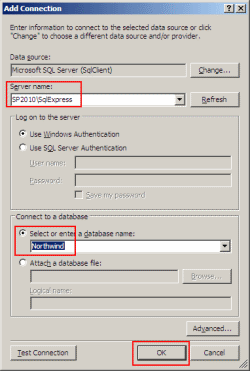
a) To connect to database, we go to "Tools" >> Connect to Database >>  Connection to Database and fill in the server name and the database nameas illustrated below:


We can view the database connections via "Server Explorer" and it will display tables, stored procedure, View etc. 

b) Right-click on "LINQtoSQLWebApp" project >> Add New Item >> Select "LINQ to SQL Classes" and in the name, type in "Northwind"

 
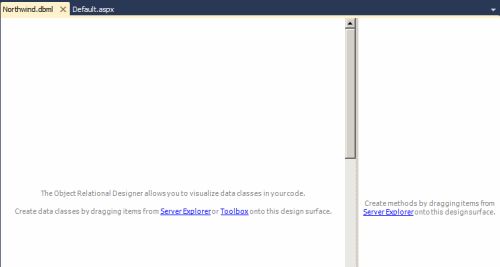
Obviously, there will be not be any class in the DBML designer surface.


We drag Product, Category, Order and Order_Detail tables to the DBML designer surface and we are done with data access layer/Data model. Each of the table has been generated as .NET object with associated properties such as ProductID, ProductName etc. When we drag the Tables from Northwind database, object mapping is done automatically.
 

Step4: Query the data via LINQ

Just for the demonstration purpose, we will query all the rows the product class via LINQ:

-------------------
NorthwindDataContext db = new NorthwindDataContext();

        var query = from p in db.Products
                         select p;

-------------------

Output:
 
What happened is that when we use LINQ query syntax against data model, LINQ to SQL automatically take this query syntax and transform into regular relational SQL expressions, query run against the database, database returns the content and LINQ to SQL constructs classes such as Product class that returns the data. The best part of LINQ syntax is we get expressive and readable constructs. LINQ is strongly typed as well. 

We can use "Where" operator to query just the "Beverages".


-------------------

NorthwindDataContext db = new NorthwindDataContext();

        var query = from p in db.Products
                         where p.Category.CategoryName == "Beverages"
                         select p;


-------------------

Output: 


We can do some further querying using powerful LINQ constructs. For e.g. in the where clause "CategoryName", we can filter category name by using LINQ operators such as count, Max, Min, Average, Spilt, ToLower, ToUpper, Sum, Remove, Replace, StartsWith etc.


-------------------
NorthwindDataContext db = new NorthwindDataContext();

var query = from p in db.Products
                    where p.Category.CategoryName.StartsWith("c")
                    select p;
--------------------

Output:


Many times, we do not need all the columns to be returned in the GridView. It can be done in LINQ as well:

-------------------
NorthwindDataContext db = new NorthwindDataContext();

var query = from p in db.Products
                    where p.Category.Products.Count > 5
                    select new
                        {
                            p.ProductID,
                            p.ProductName

                        };
-------------------

Output: 


We can use sum, count, average of LINQ operators to generate more powerful query. 


-------------------
NorthwindDataContext db = new NorthwindDataContext();

 var query = from p in db.Products
                    where p.Category.Products.Count > 5
                    select new
                        {
                            p.ProductID,
                            p.ProductName,
                            TotalUnits = p.Order_Details.Sum(o => o.Quantity),
                            Revenue = p.Order_Details.Sum(o => o.Quantity * o.UnitPrice)

                        };
---------------------


Output:


Creating Server side paging of our Query Results
One of the common needs in web scenarios is to be able to efficiently build data paging UI.  LINQ provides built-in support for two extension methods that make this both easy and efficient - the Skip() and Take() methods.

We can use the Skip() and Take() methods below to indicate that we only want to return 10 product objects - starting at an initial product row that we specify as a parameter argument. 


-------------------
NorthwindDataContext db = new NorthwindDataContext();

 var query = from p in db.Products
                    where p.Category.Products.Count > 5
                    select new
                        {
                            p.ProductID,
                            p.ProductName,
                            TotalUnits = p.Order_Details.Sum(o => o.Quantity),
                            Revenue = p.Order_Details.Sum(o => o.Quantity * o.UnitPrice)

                        };
GridView1.DataSource = query.Skip(20).Take(10);
 GridView1.DataBind();
---------------------

Output:


We have just developed a mapping objects to relational data with the Visual Studio designer tool that automated code generators which help us to create the O/RM map objects.


Besides Visual Studio designer tool that are two more options that generate O/RM map objects. 


  • SQLMetal.exe - A command line tool that generate both .DBML files and O/RM code for a given database. Its excellent for larger databases. 
  • Code Editor - Connecting classes to database objects using code.
   
Download the source here. 
References: 

1) Video by Scott Guthrie - (Part 1, Part 2 , Part 3)
2) Complete tutorials series of LINQ to SQL by Scott Guthrie

Saturday, July 10, 2010

How to: Display SharePoint groups and users in a custom application page.

Hi all,

In one of my projects, I had to develop an application page which display all SharePoint groups & users for a specific site collection and all the users even with visitor role should be able to view this page. Out-of-the-box, SharePoint 2007 does not provide this page. Therefore, I developed a solution to facilitate users.

Prerequisite:
Publishing features (site and web) level must be enabled.

What has to be developed:
  1. An custom application page 
  2. A user control and application page will host this user control.
Step1: Open Visual Studio 2008 and create a WSPBuilder and name it: DisplayGroupsUsers 
Step2: Create an application page named "DisplayGroupsUsers.aspx". (Refer to my earlier blog post)

Custom Application Page: 
-----------------------------------------------------------------------------------------
<%@ Page Language="C#" MasterPageFile="~masterurl/default.master" %>

<%--Control Place Holder--%>
<asp:Content ID="PageTitle" runat="server" contentplaceholderid="PlaceHolderPageTitle" >
   View Group Membership
</asp:Content>

<asp:Content ID="PageTitleInTitleArea" runat="server"
             contentplaceholderid="PlaceHolderPageTitleInTitleArea" >
   View Group Membership
</asp:Content>
<asp:Content ID="Main" runat="server" ContentPlaceHolderID="PlaceHolderMain">
    <div>

</div>
 
</asp:Content>
---------------------------------------------------------------------------------------------

Step3: Create a user control named: "COM_DisplayGroupsUsers.ascx": (Refer to my earlier blog post)
Step4: In this user control, we will display SharePoint groups and users in a ASP.NET TreeView control.
For a user interface for the user control, we can add some text and drag drop the TreeView control from the "Toolbox" as follows:

COM_DisplayGroupsUsers.ascx: 


---------------------------------------------------------------------------------------------------------------------
<%@ Control Language="C#" AutoEventWireup="true" CodeBehind="COM_DisplayGroupsUsers.ascx.cs" Inherits="DisplayGroupsUsers.COM_DisplayGroupsUsers,  DisplayGroupsUsers, Version=1.0.0.0, Culture=neutral, PublicKeyToken=f006780d75630210" %>
<p>
    This page displays all the SharePoint groups and users for the site.
</p>

<p>
    <asp:TreeView ID="treeView" runat="server" ImageSet="Contacts" NodeIndent="10"
        Width="250px">
        <ParentNodeStyle Font-Bold="True" ForeColor="#5555DD" />
        <HoverNodeStyle Font-Underline="False" />
        <SelectedNodeStyle Font-Underline="True" HorizontalPadding="0px"
            VerticalPadding="0px" />
        <NodeStyle Font-Names="Verdana" Font-Size="8pt" ForeColor="Black"
            HorizontalPadding="5px" NodeSpacing="0px" VerticalPadding="0px" />
    </asp:TreeView>
</p>
 ----------------------------------------------------------------------------------------------------------

 For the user control code, we have to supply the delegate (SPSecurity.RunWithElevatedPrivileges) so that all users can view all SharePoint groups and users. Once its done,we have to manipulate Groups and users in a treeview.

---------------------------------------------------------------------------------------------------------
COM_DisplayGroupsUsers.ascx.cs: 
using System;
using System.Collections;
using System.Configuration;
using System.Data;
using System.Web;
using System.Web.Security;
using System.Web.UI;
using System.Web.UI.HtmlControls;
using System.Web.UI.WebControls;
using System.Web.UI.WebControls.WebParts;
using Microsoft.SharePoint;


namespace DisplayGroupsUsers
{
    public partial class COM_DisplayGroupsUsers : System.Web.UI.UserControl
    {
        protected void Page_Load(object sender, EventArgs e)
        {
            if (!IsPostBack)
            {
                  SPSecurity.RunWithElevatedPrivileges(delegate
                                                           {

                                                               //Get the current site
                                                               using (SPSite site = new SPSite(SPContext.Current.Site.ID))
                                                               {
                                                                   using (SPWeb currentWeb = site.OpenWeb())
                                                                   {
                                                                       // set the tree view properties
                                                                       treeView.ShowLines = true; //show lines
                                                                       treeView.ExpandDepth = 1; //expand level one in the treeview
                                                                       
                                                                       //get all the SharePoint groups within current site
                                                                       SPGroupCollection groupCollection =
                                                                           currentWeb.Groups;

                                                                       //loop all SharePoint groups
                                                                       foreach (SPGroup group in groupCollection)
                                                                       {
                                                                           //get all the SharePoint users within a specified group
                                                                           SPUserCollection userCollection = group.Users;

                                                                           //build the tree
                                                                           TreeNode rootNode = new TreeNode(group.Name,
                                                                                                            "",
                                                                                                            "~/_layouts/images/GroupsUsers/Groups.gif",
                                                                                                            "", "");
                                                                           treeView.Nodes.Add(rootNode);

                                                                           //loop the users in a specific SharePoint group
                                                                           foreach (SPUser user in userCollection)
                                                                           {
                                                                               //add a new node for the current user
                                                                               TreeNode newNode = new TreeNode(
                                                                                   user.Name, "",
                                                                                   "~/_layouts/images/GroupsUsers/User.gif",
                                                                                   "", "");
                                                                               rootNode.ChildNodes.Add(newNode);

                                                                           }

                                                                       }

                                                                   }
                                                               }

                                                           });
               
            }

        }
    }
} 
------------------------------------------------------------------------------------------------

Step5: In the DisplayGroupsUser.aspx page, we need to host the user control as follows:

 DisplayGroupsUsers.aspx with user control: 

-------------------------------------------------------------------------------------------------- 
<%@ Page Language="C#" MasterPageFile="~masterurl/default.master" %>

<%@ Register src="~/_controltemplates/COM_DisplayGroupsUsers.ascx" tagname="COM_DisplayGroupsUsers" tagprefix="wssuc" %>

<%--Control Place Holder--%>
<asp:Content ID="PageTitle" runat="server" contentplaceholderid="PlaceHolderPageTitle" >
   View Group Membership
</asp:Content>

<asp:Content ID="PageTitleInTitleArea" runat="server"
             contentplaceholderid="PlaceHolderPageTitleInTitleArea" >
   View Group Membership
</asp:Content>
<asp:Content ID="Main" runat="server" ContentPlaceHolderID="PlaceHolderMain">
    <div>
<wssuc:COM_DisplayGroupsUsers ID="COM_DisplayGroupsUsers" runat="server" />

</div>
 
</asp:Content>

--------------------------------------------------------------------------------------------

The final project structure will look like this:

Step6: Build and deploy the WSP. Go to Site Actions >> Check if both the publishing features have been activated >> Once verified, Activate our groups and users feature >> Navigate to the "Pages" document library >> Upload the "DisplayGroupsUsers.aspx" page which is located at 12 hive >> Templates >> Features >> DisplayGroupsUsers folder. The final custom application page will look this:


Cheers,
--aaroh

Download the source here.

Reference: Creating a Tree View Control WebPart

Sunday, June 27, 2010

Enabling javascript IntelliSense in Visual Studio 2010 for SharePoint 2010

Hi all,

Its quite confusing when you develop a custom dialog box or customize ribbon control in SharePoint 2010 there is no javascript IntelliSense in VS 2010. Its easy to enable by adding referencing these JavaScript files on the top:

/// <reference name="MicrosoftAjax.js" />
/// <reference path="file://C:/Program Files/Common Files/Microsoft Shared/Web Server Extensions/14/TEMPLATE/LAYOUTS/SP.core.debug.js" />
/// <reference path="file://C:/Program Files/Common Files/Microsoft Shared/Web Server Extensions/14/TEMPLATE/LAYOUTS/SP.debug.js" />

Its a tip from Chakkardeep's blog.
In fact, its similar for Microsoft Ajax library where ASP.NET developers have to add a reference to the MicrosoftAjax.js to the JavaScript files.

/// <reference name="MicrosoftAjax.js"/>

Cheers,
--Aaroh

Friday, June 18, 2010

The solution cannot be removed when a job is scheduled or running.

Hi All,


While working for a custom feature which is a third party component for SharePoint. Somehow, I wanted to removed and eventually delete this feature. Surprisingly, when I tried rectract this feature via Central Admin, I got a an error.

BUG:
The solution cannot be removed when a job is scheduled or running.  

After googling, someone had the same issue. What we have to do is follow these steps:

  1.  Open command prompt and enumerate the running deployments by executing this command: 
    stsadm -o enumsdeployments
  2. Now, we obtain the jobid and cancel this deployement as follows:
    stsadm -o canceldeployment -id 2529c788-971c-46a3-b69f-a2a0a1fcc851
That's it. We can then retract and delete the solution. 

Cheers,
--aaroh

Friday, May 28, 2010

My tryst with groups and custom permissions programmatically in SharePoint 2007,


Hi all,

Of late, I had to work for a project where business needed custom groups and permissions to be provisioned. Well, working with creating custom groups/permissions programmatically is not cup of tea as concepts are quite involved.

Business requirement:

There are different set of groups which has to be hooked to a site and document library.

GroupWeb permission List permission
Manager Can add users into different groups but
can not  create new group not add/edit/delete items
in a document library. (Custom permission)
Read only
AuthorCan add/edit/delete his/her own document but can not
delete other's users document. (Event handler)

Contribute
ContributorCan add/edit/delete document. (SharePoint OOTB permission)Contribute
System AdministratorHas full control (SharePoint OOTB permission)Full control

The SharePoint Security Model: 

When we create site via "Central Admin" and choose Team or Blank template, by default SharePoint creates three groups as follows:

Group                                Site Owners            Site Contributors                     Site Visitor              
Permission levelFull ControlContributor Read
Permissions Contribute permissions +
Manage Lists, Override checkout
Read permissions +
Add, Edit, Delete items, delete versions

View, Open items, View versions, create alerts, View Application pages

NOTE: 

1) Please note if we create sites programmatically, the default groups will be not present. 
We have to create these groups programmatically via code. 


2) When we develop our custom groups or role definitions, its most important that we have to "RunWithElevatedPrivileges" which is a delegate method that run with elevated privileges. This method runs under "Application pool" identity.    


Caveat!!

Daniel Larson does NOT recommend
RunWithElevatedPrivileges method in the object model but use "SPUserToken" to impersonate. Also, check out this blog where author has elevated the privileges without using  RunWithElevatedPrivileges method. 


Creating groups programmatically: 


I have to develop groups and permissions in a separate classes so that even the permission have been changed groups part is intact.  In my scenario, I have 4 SharePoint Groups and Manager group is the one who can create add/remove users in any of 4 SharePoint groups but he/she could be delete any lists and should have access to the lists as read-only access.


I have defined a GroupHelper class, which create a those 4 SharePoint groups. When I provided  my custom SharePoint group and added a user named "local1Manager" who is in "Manager" (SharePoint Group). When I logged in as "local1Manager", I was not able to add any user in any SharePoint Group such as Manager, Contributor, System Administrator and Author. SharePoint displayed this message: 


You do not have permission to view the membership of the group
 

I also looked at one of person who had same issue. Apparently, when we create a SharePoint site, three SharePoint groups are provided by default (Site Owners, Site Members and Site Visitors). These groups have a permission level (Full Control/Contribute/Read) 


Group                             Permission level                                  Group Owner      
Site OwnersFull Control Site Owners
Site MembersContributeSite Owners
Site VisitorsReadSite Owners


This means, that Site Owner MUST BE group owner for all the groups as well.


 By default, when we create the groups programmatically, the group owner will be always "System Account". But I wanted to give this role to my own custom SharePoint Group (Manager) and explicitly assign the group owner as "Manager" for all 4 custom SharePoint Groups. 


The  bottom line is that, when we create groups programmatically and in one of the group such as "Manager" who want to add users to some other groups then, we MUST explicitly assign the group owner as manager for all other SharePoint groups.
  
Following is the code: 


Receiver Code

-----------------------------------------------------------------------

namespace Company.SiteProvisioning
{
    class CompanyGroups : SPFeatureReceiver
    {

        public override void FeatureActivated(SPFeatureReceiverProperties properties)
        {
            //Get the web instance
           using (var web = properties.Feature.Parent as SPWeb)
            {
                if (null != web)
                {

                    #region 1) Creating the Custom Groups here

                    GroupsHelper.CreateGroups(web);
                    #endregion 
                } 
            } 
      }
}


---------------------------------------------------------------------------


GroupHelper.cs 
--------------------------------------------------------------------------


namespace Company.Common.Utilities 
{
    public class GroupsHelper
    {
        #region Methods

         /// <summary>
        /// This function creates all the Company groups
        /// </summary>
        /// <param name="web">The web where groups have to be created.</param>
        public static void CreateGroups(SPWeb web)
        {
            SPGroup group;

            try
            {
                #region 1) For Manager (Manager will be "Group Owner" for other custom SharePoint groups)
                             if (!SPUtility.GroupExists(web, Groups.ManagerName))
                                {


                                      #region i) Create an Company Group

                                                 web.SiteGroups.Add(Groups.ManagerName, web.Site.Owner, web.Site.Owner, Groups.ManagerDescription);
                                                 group = web.SiteGroups[Groups.ManagerName];

                                      #endregion

                                       #region ii) Bind the web to the associated groups

                                                web.AssociatedGroups.Add(group);
                                                web.Update();

                                      #endregion

                                      #region iii) Assign the custom group owner to be "Manager"

                                                 group.Owner = web.SiteGroups[Groups.ManagerName];
                                                 group.Update();

                                      #endregion
                              } 

                              // DO THE SAME STUFF OF OTHER 3 CUSTOM SharePoint Groups


            } 

         }


--------------------------------------------------------------------------------------------------------------


Theory of SharePoint security, Role definitions, Role Types, Role assignments and ISecurableobject: 


SharePoint 2007 technologies is on top of and depends on the security of underlying technologies such as: 
>> ASP.NET 
>> IIS 6/7
>> SQL Server 2005/2008/2008 R2
>> Windows server 2003/2008 
as well firewall configuration. 


Any web application for SharePoint site is only as secure as its weakest link and therefore security is a concern across all the components of our SharePoint 2007 deployment. Security is addressed at different levels in SharePoint that includes: 
>>Organization's security policies 
>>SharePoint Product and Technology configuration 
>> Windows Server 2003/2008 configuration 
>> IIS configuration  
>> ASP.NET configuration  
>> communication configuration  etc. 


SharePoint product and technology make use of a number of technologies so that it mitigates the risk of security being comprised.  
  • Authentication that uses Windows principles (authentication methods, password policies, encryption etc.) 
  • Authorization that is based on the permission model to ensure a high level of granular control over access to contents of a site. 
  • Code access security (CAS)
  • Security techniques (such as Secure Sockets Layer (SSL, HTTPS://))

WSS 3.0 security and permission model is role-based.

a) Role Definition (Permission level):
A role definition is a collection of rights which are hooked up to a user or a SharePoint group. They have following definitions: 
>> Full Control (Administrator)
>> Contribute
>> Read
>> Design 
>> Limited access 


We can develope your own custom permission which I will use for "Manager". Manager can add users but he/she CAN NOT create a new group neither he/she can add/edit/delete documents. 


Its obviously not an OOTB permission. I have created a new class named "Permission.cs" which just details all the permissions. Later, if the business needs the permission to be altered then we have to change in  just one file i.e. Permissions.cs

If we deep dive into the SharePoint's object model, SPRoleDefinition defines a single role definition, including a name, description, management properties, and a set of rights. 


Permissions.cs 
-------------------------------------------------------------------------------------------------------------------

using System.Linq;
using Microsoft.SharePoint;
using Company.Common.Utilities;  

namespace Company.Common.Constants
{
    public static class Permissions
    {

        #region i) Permissions for the Manager

        public static SPRoleDefinition ManagerWebPermission (SPWeb web)
        {


            if (!SPUtility.IsRoleDefinitionExists(Groups.ManagerName,web))
            {
                #region i) Create a custom permission level
                SPRoleDefinition roleDefinition = new SPRoleDefinition
                                                      {
                                                          Name = Groups.ManagerName,
                                                          Description =
                                                              Groups.ManagerDescription,
                                                          BasePermissions =
                                                              SPBasePermissions.FullMask ^
                                                              (SPBasePermissions.ManagePermissions |
                                                               SPBasePermissions.ManageLists |
                                                               SPBasePermissions.AddListItems |
                                                               SPBasePermissions.EditListItems |
                                                               SPBasePermissions.DeleteListItems |
                                                               SPBasePermissions.ViewVersions |
                                                               SPBasePermissions.DeleteVersions |
                                                               SPBasePermissions.CreateAlerts |

                                                               SPBasePermissions.CreateGroups)
                                                      };

                #endregion

                #region ii) Create a custom permission and bind it to the web

                web.RoleDefinitions.Add(roleDefinition);
                web.Update();
             

                #endregion
            }
           

            web.AllowUnsafeUpdates = true;

            SPRoleDefinition userManagerRoleDef = web.RoleDefinitions
                .Cast<SPRoleDefinition>()
                .First(def => def.Name == Groups.ManagerName);
            //SPRoleDefinition userManagerRoleDef = web.RoleDefinitions[Groups.ManagerName];

            web.AllowUnsafeUpdates = false;

            return userManagerRoleDef;
        }

        public static SPRoleDefinition ManagerListPermission (SPWeb web)
        {
            return web.RoleDefinitions.GetByType(SPRoleType.Reader);               
        }

        #endregion 

         #region ii) Permissions for the Document Author

        public static SPRoleDefinition DocAuthorWebPermission(SPWeb web)
        {
            return web.RoleDefinitions.GetByType(SPRoleType.Reader);
        }

        public static SPRoleDefinition DocAuthorListPermission(SPWeb web)
        {
            return web.RoleDefinitions.GetByType(SPRoleType.Contributor);
        }


        #endregion
}
}
}

--------------------------------------------------------------------------------------------------------------------------
 
Let's discuss the code above. SPBasePermissions defines all the built-in permissions which available SharePoint. These base permissions are extremely powerful and we can customize the permissions as we want. In the code above I have defined SPBasePermission.FullMask means for Manager who has full rights. But he do not want to give permissions full rights as he can not delete/add/edit rights. Therefore, use "^" operator to negate those permissions. Please refer how to use these operators. 

After the we have defined a custom permission level, we need to bind this permission to the web  


   web.RoleDefinitions.Add(roleDefinition);
   web.Update();


While developing the code, I found a bug which I have commented. 


//SPRoleDefinition userManagerRoleDef = web.RoleDefinitions[Groups.
ManagerName];


When I debugged the code, I got this bug. 

BUG: Microsoft.SharePoint.SPException: You cannot grant a user a permission level that is not attached to a web. at Microsoft.SharePoint.SPRoleDefinitionBindingCollection.AddInternal(SPRoleDefinition roleDefinition)
  at Microsoft.SharePoint.SPRoleDefinitionBindingCollection.Add(SPRoleDefinition roleDefinition)


 ISSUE: It may be because SharePoint doesn’t allow you to use the SPRoleDefinition you just created and you have to return the one you just added.

FIX: 
a) using System.Linq
b) SPRoleDefinition userManagerRoleDef = web.RoleDefinitions
                .Cast<SPRoleDefinition>()
                .First(def => def.Name == Groups.ManagerName);

it will fix this issue. 


b) Role Assignment: We have defined a custom permission level that is bound to the web. But, now we have to bind this permission level to the user or the SharePoint group. This can be achieved by leveraging the role assignment. The SPRoleAssignment class defines the role assignments for a user or group on the current object.


The RoleAssignment property comes with an interface named: ISecurableObject. This interface is extremely useful as we can implement by the SharePoint: 
SPWeb, 
SPList, 
SPListItem classes.
Have a look onto its implementation at this URL. 


Therefore, I added one more function as follows: 


GroupHelper.cs 
-----------------------------------------------------------------------------------------------------------


    /// <summary>
        /// This function assigns the permissions to the web or to the list.
        /// </summary>
        /// <param name="web">The web</param>
        /// <param name="securableObject">Securable object which could be a web, list or list item</param>
        /// <param name="principal">Principal could be a group or an individual user.</param>
        /// <param name="roleDefinition">The permission level bound to a specific user or group</param>
        public static void AssignPermissions(SPWeb web, ISecurableObject securableObject, SPPrincipal principal, SPRoleDefinition roleDefinition)
        {
            //Assign the role to group/users
            SPRoleAssignment roleAssignment;
            //SPList list;
            try
            {

                if (securableObject.GetType().Name == "SPWeb")
                {

                    web.AllowUnsafeUpdates = true;

                    #region i) Get an SPPrincipal (Group/Users) and assign custom permission level

                    // create a new role assigment for the group/users
                    roleAssignment = new SPRoleAssignment(principal);

                    //bind the role assignment to the role definition
                    roleAssignment.RoleDefinitionBindings.Add(roleDefinition);

                    #endregion

                    #region ii) Bind the role assignment to the web, associate the group to the web and update

                    //bind the role assignment to the web, associate the group to the web and update
                    web.RoleAssignments.Add(roleAssignment);
                    web.AssociatedMemberGroup = (SPGroup) principal;
                    web.Update();

                    #endregion

                    #region iii) Assign the role assigment to the securableObject

                    securableObject.RoleAssignments.Add(roleAssignment);

                    #endregion

                    web.AllowUnsafeUpdates = false;
                }

                if(securableObject.GetType().Name == "SPDocumentLibrary")
                {
                    web.AllowUnsafeUpdates = true;

                    #region i) Check if the Doc Lib has unique permissions or not.

                    if (!securableObject.HasUniqueRoleAssignments)
                    {
                        securableObject.BreakRoleInheritance(true);
                    }

                    #endregion

                    #region  ii) Get the reference of role assignment to the SPPrincipal(Group), Bind role assigment to roledefintion
                       
                        roleAssignment = new SPRoleAssignment(principal);
                        roleAssignment.RoleDefinitionBindings.Add(roleDefinition);

                    #endregion

                    #region iii) Bind the role assigment to the securableObject

                        securableObject.RoleAssignments.Remove(principal);
                        securableObject.RoleAssignments.Add(roleAssignment);

                    #endregion

                    web.AllowUnsafeUpdates = false;
                }

            }
            catch (Exception ex)
            {
                SPUtility.LogToULS(ex);
            }

        }

        #endregion
------------------------------------------------------------------------------


This functions come with 4 parameters: 
AssignPermissions(SPWeb web, ISecurableObject securableObject, SPPrincipal principal, SPRoleDefinition roleDefinition)

SPWeb:  The Web object we pass in the feature receiver. 
ISecurablObject: The web, SPList or the ListItem parameter and therefore gives flexibility in the code.
SPPrincipal: A SharePoint user or a group. 
SPRoleDefinition: The custom permission level which is pre-defined. 


Once we are defined with custom SharePoint groups permissions, we complete out code for the feature receiver.


Receiver Code

-----------------------------------------------------------------------

namespace Company.SiteProvisioning
{
    class CompanyGroups : SPFeatureReceiver
    {

        public override void FeatureActivated(SPFeatureReceiverProperties properties)
        {
            //Get the web instance
           using (var web = properties.Feature.Parent as SPWeb)
            {
                if (null != web)
                {

                    #region 1) Creating the Custom Groups here

                    GroupsHelper.CreateGroups(web);
                    #endregion  

                     SPSecurity.RunWithElevatedPrivileges(delegate
                        {
                          
                                    #region 2) Assign the permission to the groups. Permissions to the web and to the list

                                    SPGroup grp;
                                    //SPRoleDefinition roleDefinition;

                                    #region i) Manager

                                    grp = web.SiteGroups[Groups.rManagerName];

                                    GroupsHelper.AssignPermissions(web, web, grp,
                                                                   Permissions.WebPermission(web));
                                    GroupsHelper.AssignPermissions(web, web.Lists[Register.ListDocLibName], grp,
                                                                   Permissions.ManagerListPermission(web));

                                    #endregion

                                    #region ii) Doc Author

                                    grp = web.SiteGroups[Groups.DocAuthorName];

                                    GroupsHelper.AssignPermissions(web, web, grp,
                                                                   Permissions.DocAuthorWebPermission(web));
                                    GroupsHelper.AssignPermissions(web, web.Lists[Register.ListDocLibName], grp,
                                                                   Permissions.DocAuthorListPermission(web));

                                    #endregion

                } 
            } 
      }
}


Note that in permissions.cs we have defined custom permission level for Manager on the web but reader permission on the lists. Whereas, author/contributor has read only access to the web but contributor permission to the list. 


I guess, these sample codes will give an idea on SharePoint groups and permissions. 


Cheers, 
--aaroh 


References: 
BUG: You cannot grant a user a permission level that is not attached to a web.
BUG: You do not have permission to view the membership of the group  
SharePoint Groups and Permissions concepts (Reza)
Sample codes for groups/permissions  
SPRoleDefinition class, SPRoleAssignment class, SPBasePermissions class, ISecurableObject 1, ISecurableObject 2


Low Code Reimagined with AI + Copilot Pitch Deck - Copy Copilot day (Virtual) - 2023

 Hi All,  I presneded a session at Pune UG on Low Code Reimagined with AI + Copilot Pitch Deck.  Video is at this address  https://www.youtu...